MacBook Battery Replacement Service

Dead batteries can be frustrating. If your MacBook battery drains fast, does not charge or has swollen, we replace it at Good Zone, 1722 Kings Hwy in Midwood, Brooklyn, and you get a quote before any work starts.
Laptop Repair

Tell us about your problem


    We check the battery health, the cycle count, the charger and the charging port first, so you do not pay for a battery when the fault is somewhere else. Diagnostics cost $75 and count toward the repair if you go ahead.

    Reach out to us through either of our suitable service options:

    Service detail

    Why does the MacBook battery die?

    MacBook batteries can die due to a variety of reasons. Some common causes include age, operating in high temperatures, and simply going through too many charge cycles. Additionally, using power-intensive applications or running multiple processes at once can also take a toll on your MacBook's battery life. It's important to properly maintain your battery by keeping it charged between 20% and 80%, avoiding extreme temperatures, and minimizing battery-draining activities. If you are experiencing issues with your MacBook's battery life, our technicians are here to help pinpoint the underlying cause and provide the necessary repairs or replacements.

    Why Choose Good Zone Service & Repairs for MacBook Battery Replacement?

    Having your MacBook battery replaced by Good Zone Service & Repairs is a great idea for several reasons:

    • You get a quote after diagnostics and approve the price before any work starts
    • Repairs come with a 30-day limited warranty
    • Walk-ins welcome 7 days a week, 10 AM to 7 PM, near the Kings Hwy B/Q station

    MacBook Battery Replacement Cost
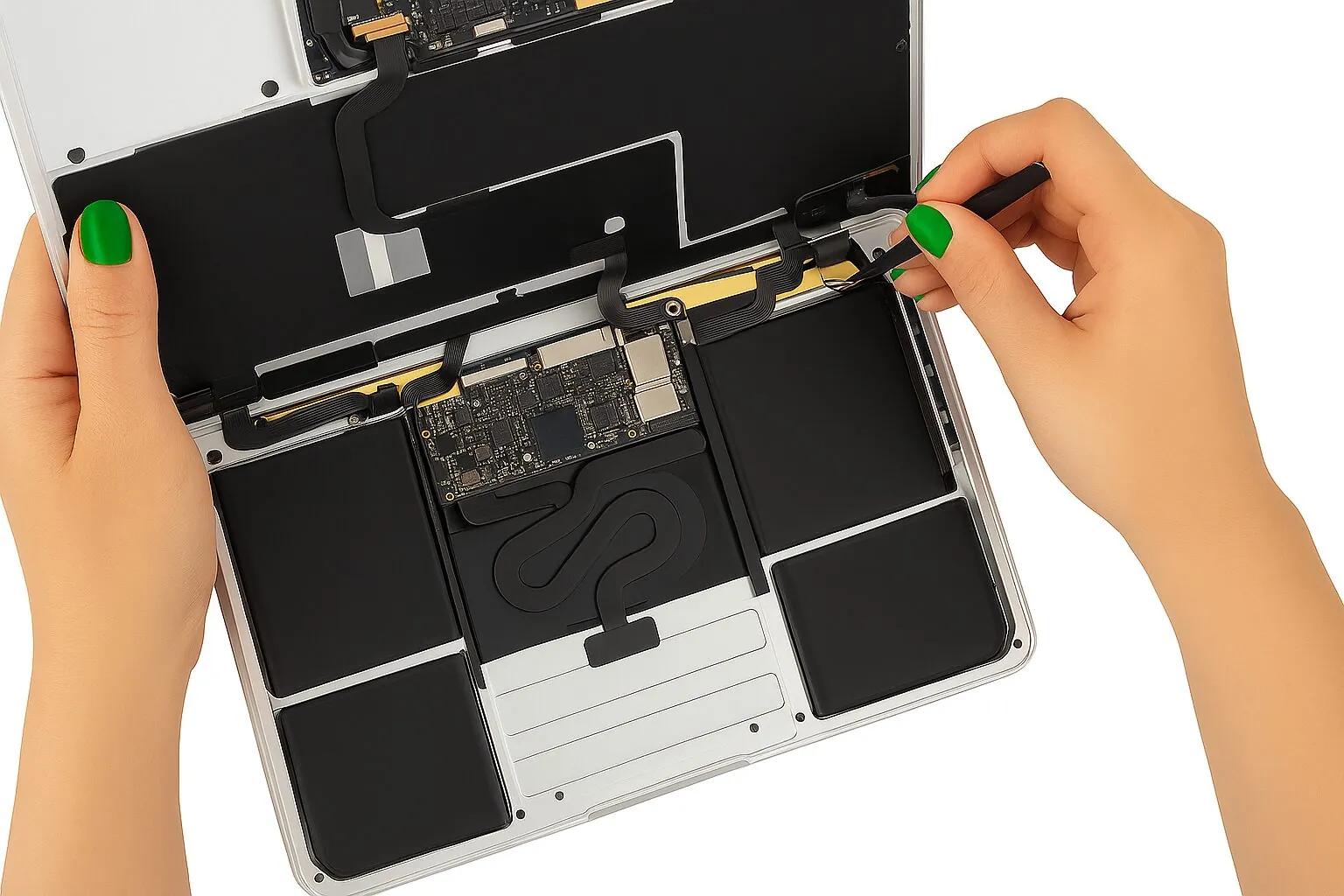
    MacBook battery replacement

    Many customers wonder: "How much is a MacBook battery replacement?" The answer depends on several factors including your specific model and battery type, and on whether a swollen battery has damaged the trackpad or case. We quote after diagnostics. Diagnostics cost $75 and count toward the repair if you go ahead. You approve the price before any work starts; nothing is repaired without your yes.

    For MacBook Pro specific battery replacement services, check out our MacBook Pro battery replacement page. For MacBook Air, see MacBook Air battery replacement. All other Mac laptop services are on our MacBook repair page.

    Signs Your MacBook Battery Needs Replacement

    When your MacBook battery starts showing warning signs—like unexpected shutdowns, swollen casing, or a drastically reduced runtime—time is truly of the essence.

    A swollen battery can push up the trackpad and keyboard and bend the case. Stop using and charging the MacBook and bring it in.

    Before You Bring Your MacBook In

    • Back up your files if the MacBook still starts.
    • Bring your charger, so we can test it too.
    • Note any battery message you see, such as "Service Recommended".

    No appointment needed—walk-ins welcome! Time depends on the fault; we tell you after diagnostics. Questions before you come? Contact Good Zone Service & Repairs.

    About us

    Our Team

    Good Zone Shop & Repair Service is located in Brooklyn. Our service provides customers with fast, fair, and affordable device repairs.

    No longer needing to worry about purchasing new devices because of unexpectedly costly repair fees, GoodZone repair is the perfect solution for you.

    Why us?

    • 1

      15+ years of
      experience

    • 2

      1,200+
      repairs a year

    • 3

      4.8 ★ from
      700+ Google reviews

    iPhone X Repair

    Do you have any questions?

    Do you have any questions?


      MacBook battery customers on Google

      sue A.
      5

      Super friendly guys and very accommodating. Changed the battery on my MacBook quickly. Reasonable prices.

      Merab E.
      5

      I changed buttery for my MacBook! Well dome Great Job! Strongly Recommend for all my friends!!!

      FAQ

      Can I replace my MacBook Pro battery myself?

      You can replace your MacBook battery yourself if you have the necessary skills. On recent MacBook models the entire laptop has to be taken apart to replace the battery. Also, there's a risk of fire in case you puncture the lithium battery. The safest way to go about this is by seeking professional assistance.

      Is a Mac battery replacement covered by Apple?

      It can be, if your MacBook is still under Apple's warranty or AppleCare+. Eligibility can be determined by checking your laptop's serial number on Apple's website. Out of coverage, we quote the replacement after diagnostics.

      When should I replace my MacBook battery? What are the signs?

      You should consider a replacement if you notice these signs:

      • "Service Battery," "Replace Soon," or "Replace Now" warning: Check by clicking the battery icon in your menu bar.
      • Battery drains very quickly: If your runtime is significantly less than when it was new (e.g., under 25% of original duration).
      • Unexpected shutdowns: Especially if it happens frequently when not plugged in.
      • Overheating: If the bottom feels unusually hot during normal use.
      • Slow performance: Sometimes a failing battery can throttle performance.
      • Physical swelling: If the case looks bulged or the trackpad is hard to click.
      • High cycle count & low capacity: If the cycle count is near 1000 (for most models post-2010) and the full charge capacity is below 80% of its original design capacity. You can check this in System Information.

      How long does a MacBook battery last before replacement is needed?

      A MacBook battery is designed to retain up to 80% of its original capacity after 1000 full charge cycles. Depending on your usage patterns (how often you charge/discharge it), this typically translates to about 3 to 5 years of use before performance noticeably degrades and replacement is recommended. Regular users who charge daily might reach this point sooner than occasional users.

      Can I replace the MacBook battery myself? How difficult is it?

      DIY battery replacement is possible, especially for older MacBooks (like pre-Retina models) where it might involve just removing screws and swapping the battery. However, for newer models like the 12-inch Retina (A1534), the battery is often glued in, requiring specialized tools (Pentalobe screwdrivers, spudger, adhesive solvent), careful handling to avoid damaging delicate components, and more time.

      While DIY kits from places like iFixit or OWC are cheaper, there's a risk of damaging your MacBook or causing dangerous battery issues.

      Where is Good Zone located? Is it convenient for Brooklyn residents?

      Good Zone is conveniently located at 1722 Kings Hwy in Midwood, Brooklyn, between E17th Street (Telco Clothing Store) and E18th Street (Walgreens), directly across from Green Forest Market. We're accessible via multiple transportation options:

      • By train: Take the B or Q lines to Kings Hwy station
      • By bus: B49 to Ocean Avenue/Kings Hwy, B31 to Quentin Rd/E16 St, or B7/B82 to Kings Hwy/E18 St
      • By car: Metered parking is available next to our storefront.

      Our central Midwood location serves residents from across Brooklyn including Flatbush, Sheepshead Bay, Brighton Beach, and Park Slope. We're open 7 days a week from 10 AM to 7 PM. If you cannot come in, use our mail-in repair service.

      Contact us today to schedule your MacBook battery replacement or simply walk in during our business hours!

      iPhone X Repair

      Request your
      consultation

      Request your consultation